Free · nothing to install

Run the whole day from one screen.

Fixtures, knockouts, referees and live tables for every age group at once. And when a team pulls out at eight in the morning, it rebuilds the entire day in ten seconds.

Built for grassroots clubs · works anywhere
Zokko SAVED
Pitch 1
Pitch 2
Pitch 3
09:30
Wellington 3Ashcombe 1
Marlow 2Kingsdown 2
OakvaleCrayford
09:45
Barrowfield 0St Elmo's 2
RedhillThornbury
ElmwoodHighfield
10:00
WellingtonMarlow
AshcombeKingsdown
  
Wellington Wanderers
Under 9s
Next match in 18 min
10:15 · Pitch 2
v Marlow Colts
09:30v AshcombeW 3–1
09:45v KingsdownD 1–1

Most tournaments still run on a spreadsheet and a shout.

One volunteer builds the fixtures in Excel over a fortnight. On the day it's printed on a wall, results walk to the desk in someone's pocket, and the tables are twenty minutes out of date all afternoon. Then it rains, a team doesn't turn up, and the whole thing has to be redone by hand with forty people waiting.

Every tool out there is built for planning. Nothing is built for the chaos.
What it does

The things that actually go wrong on the day.

Anyone can generate a fixture list. Zokko is built for the four hours where the plan falls apart.

A team drops out

Remove them and the whole day rebuilds — fixtures, pitches, kick-off times, knockout bracket — keeping every result already played. Ten seconds instead of an hour.

It starts raining

Push the day back, then see instantly what you'd need to trim to still finish on time. It tells you how to recover, not just that you're late.

Scores from the pitch

A code on each corner post. Whoever's marshalling scans it, taps in the score, and it lands at your desk for approval. Nothing touches a table until you accept it.

Every age group at once

U7s, U9s and U11s on their own pitches with their own match lengths, sharing your referees, in one timetable. Not three separate accounts.

Everything on paper too

Wall timetable, a card per manager, a sheet per pitch, registration list and certificates. Because the signal will die in a field, and paper never does.

Cards, first aid, the lot

Yellows and reds by shirt number, with suspensions carried into later games. A first-aid shout that goes straight to the desk. Registration ticked off as teams arrive.

For parents and coaches

One link, and the questions stop.

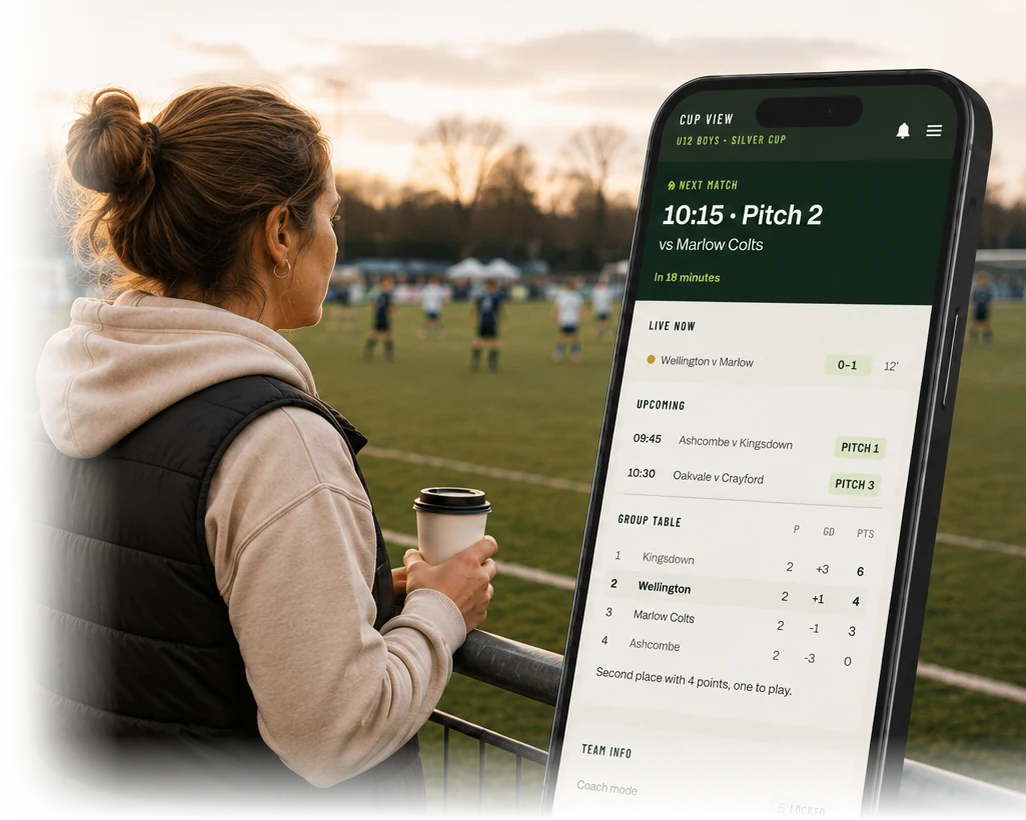
Send it out with the entry email. A parent picks their child's team once, and from then on the page is only about them.

  • Next match, in minutes. "In 18 minutes, pitch 2, v Marlow Colts" — far more use than a kick-off time when you're at the burger van.
  • Their day at a glance. Results so far, what's live now, what's still to come.
  • Their group table, with a plain sentence underneath: second with 4 points, one to play.
  • Coach mode. One tap and a manager also sees suspensions and cards against their own team — the things they need before naming a side.
  • Where everything is. Parking, toilets, food, the presentation time, and your site map. No login, no app.
Ashcombe Summer Cup
Under 9s · Under 11s
10:15Wellington v Marlow
10:15Ashcombe v Kingsdown
10:30Oakvale v Crayford
10:30Elmwood v Highfield
10:45Redhill v Thornbury
Wellington Wanderers
Under 9s
Next match in 18 min
10:15 · Pitch 2
v Marlow Colts
09:30v AshcombeW 3–1
09:45v KingsdownD 1–1
10:15v Marlow
What a parent sees after tapping your link
See it working

Short clips, not a webinar.

Each one shows a single thing that goes wrong on a tournament day, and what Zokko does about it.

Recording soon

A team drops out at 8am

One click, and the entire day rebuilds around the gap — keeping every result already played.

About 60 seconds
Recording soon

Building a tournament from scratch

Two age groups, eight pitches, teams pasted in from an email. Timetable and knockouts in a couple of minutes.

About 3 minutes
Recording soon

Rain, and getting the day back

Push everything back half an hour, then work out what to trim so you still clear the site on time.

About 90 seconds
Recording soon

What parents and marshals see

The link you send out, and what a marshal sees after scanning the code on the corner post.

About 2 minutes
How it works

Three steps, and none of them involve me.

Set it up whenever

Paste in your teams, pick your pitches and match lengths, and build the timetable. Do it in one sitting or come back to it over a fortnight — it saves as you go.

Print the pack

Wall timetable, a card for every manager, sheets for the pitches, registration list and codes for the corner posts. All from one button.

Run the day

Keep it open on a laptop at the desk. Scores go in, tables move, and when something changes it works out the knock-on effects for you.

About

Made by one person, in Lancashire.

Zokko started because running a junior tournament is a genuinely hard scheduling problem that somehow still gets solved with a spreadsheet and a laminator. Nobody had built the thing that helps when it all goes sideways — and that's the part organisers actually dread.

It's one person building it, which cuts both ways. If you email about something annoying, you're emailing the person who can change it, and it'll probably be fixed that week. On the other hand, I'm not a call centre.

It's free while it's new. I'd rather a handful of clubs used it properly and told me what's wrong than charge anyone for something unproven.

Straight answers

  • No account, no card, no app to install
  • Works on any laptop with a browser
  • Nothing is shared with anyone
  • Download a copy of your tournament any time
  • Paper backup for everything
Cost

Free while it's new.

No trial, no card, nothing that expires. If it saves you a Saturday, tell someone.

£0 this season
Open it now

Later there'll be a small fee for bigger tournaments — less than the entry fee for one team. Small ones stay free.

Questions

The ones people ask.

Do I need to install anything?

No. It's a website. Open it in whatever browser you already use, on whatever laptop you already have. Nothing to download, no account to make, no password to forget.

What if the wifi goes down at the ground?

Print the pack beforehand and you can run the entire day on paper — timetable, pitch sheets, registration list, blank tables. That's not a grudging fallback; it's how tournaments have always worked and it should keep working.

Can more than one person use it at once?

Not yet. Right now it runs on one laptop at the desk. Live entry from pitch-side phones is the next thing being built.

What happens if I close the browser?

It saves itself as you go and offers to bring it back when you return. You can also download a copy as a file — worth doing before the day, so someone else can pick it up if your laptop dies.

Does it handle more than one age group?

Yes, and that's the point. Each age group gets its own pitches and match lengths, they share your referees, and it all appears in one timetable. Rain affects the whole site, so recovery works across every group at once.

How does it decide who goes through when teams are level?

Points, then goal difference, then goals, then the head-to-head — or head-to-head first if that's what your rules say; it's a setting. Three teams level are compared as a proper mini-league. If nothing separates them it stops and asks you to toss for it, then records what you decided.

Is my data going anywhere?

No. Everything stays in your own browser. There's no account, no server holding your tournament, and nothing shared with anyone.

What about other sports?

The scheduling is the same problem for netball, hockey, rugby or cricket — it just says "pitch" a lot. If you run one of those and fancy trying it, get in touch.

Running a tournament this season?

Open it and build yours now — it takes a few minutes and costs nothing. If something's missing or annoying, email me. That's genuinely the most useful thing you could do.